


Wellsite Navigator
4.0527.00 Reviews
App Specs
- Version
- 6.7.2
- Updated On
- License
- Free
- Downloads
- 100,000+
- Developer
- Wellsite Navigator, LLC
- Categories
- Maps & Navigation
- Platform
- Android
Screenshots
 Analysis by AppCompare
Hey there! So, I recently got my hands on an app called Wellsite Navigator, and let me tell you, it's been quite the game-changer for anyone involved in the oil and gas industry. If you're like me and love discovering tools that make life a bit easier, stick around as I dive into what makes this app tick.
First trips: where the appeal comes from
The first useful moment is easy to picture: you have a work address or wellsite to reach, but a regular map does not make that destination easy to identify. A dedicated oilfield navigation app has a narrower job than a general-purpose GPS, and that focus is what makes it worth trying if your work regularly takes you to wells. Instead of treating every destination like a shop or street address, you can search around the places your field day is actually built around.
That focus is not automatically useful to everyone. If your driving is mostly between familiar offices, towns, and customer addresses, the maps already on your phone may be simpler. I would give this app a place in my routine when site names and coordinates are part of the job, not just because I want another navigation app installed.
Getting Started with Wellsite Navigator
First things first, downloading the Wellsite Navigator app is a breeze. Available on both Android and iOS, it's just a quick tap in the app store and you're ready to roll. Once you fire it up, you'll notice a clean and intuitive interface that doesn't overwhelm you with options. It's designed with usability in mind, which is always a win in my book.
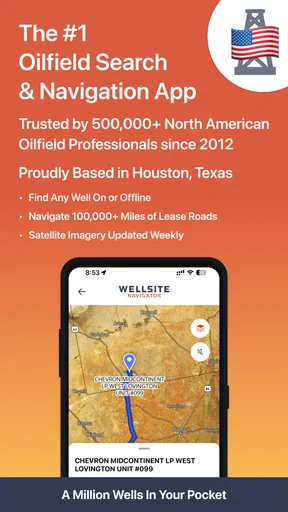
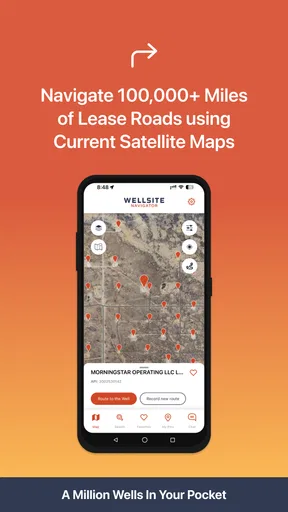
Now, if you're wondering what this app actually does, let me break it down. It's essentially a GPS-based tool that helps you locate and navigate to oil and gas well sites. Whether you're a field operator or a service provider, having accurate directions to a site can save you tons of time and headache. No more fiddling with maps or second-guessing your route!
Features That Stand Out
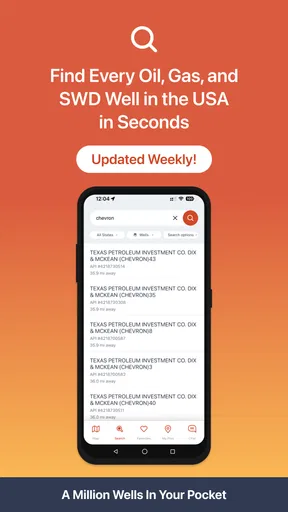
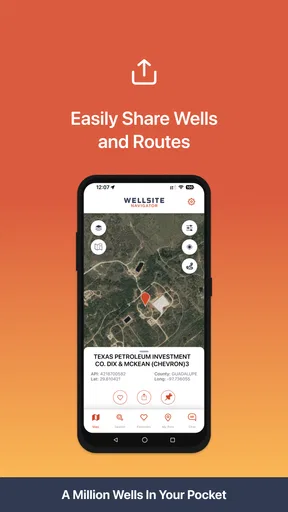
One of the standout features of this app is its extensive database of well sites. I was pleasantly surprised to find that it covers a vast range of locations, and the search functionality is top-notch. You can easily filter and find the well site you're looking for, complete with details like name, operator, and location coordinates.
When several results look similar, I would check the operator and coordinates before setting off rather than choosing only by name. That small habit is especially useful when a workday includes more than one destination: confirm the right entry, then save it so you are not repeating the same search later. A saved list can also serve as a simple day plan, with the next location ready while you are still at the previous stop.
Worth Reading Before You Choose

EA SPORTS FC Mobile 26 Is a Bigger Football Game, but It Takes Time

Flipboard Shows What News Apps Must Do Beyond the Feed

Switching to Android Auto Means Rethinking Your Driving Routine

Google Calendar Makes a Crowded Week Easier to Manage

Ludo King Makes the Most of the Minutes Between Plans

Baby Panda World Brings Quick Play to Modern Phones, but Its Game Library Feels Busy
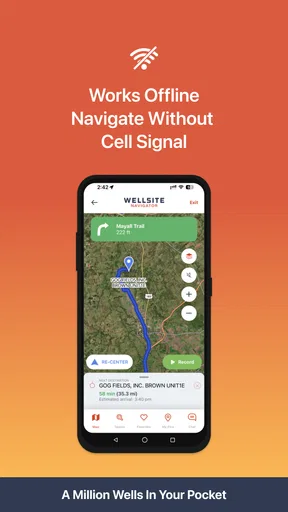
Another neat feature is the offline access. Yes, you heard that right! Even when you're in the middle of nowhere with spotty service, Wellsite Navigator has your back. You can download maps and access them without an internet connection. It’s a lifesaver for those remote areas where connectivity is less than ideal.
Offline access is most valuable when prepared before leaving reliable coverage. I would check that the maps needed for the trip are available on the device while still connected, instead of assuming the phone can fetch everything once a signal drops. It also makes sense to keep enough battery for the navigation itself; an offline map solves the connection problem, not the practical problem of a phone running out of power.
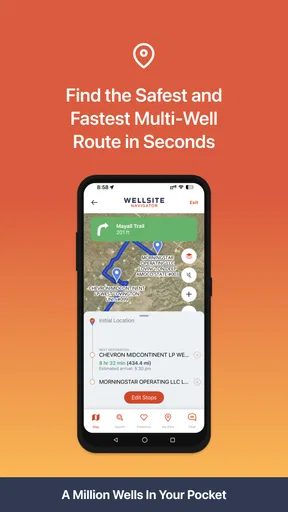
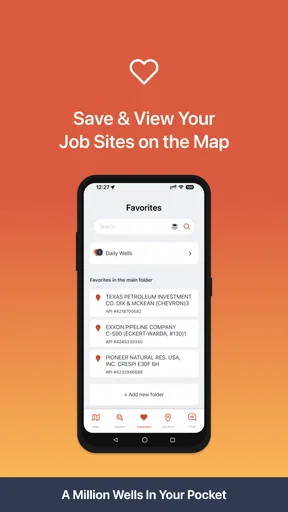
For those who like to keep things organized, the app lets you save and manage multiple locations. It's perfect for keeping track of your frequently visited sites or planning out your workday in advance.
Month-to-month usefulness and a realistic workday
The value here is less about novelty than repetition. If you visit the same fields regularly, saved locations can reduce the small bits of friction that accumulate across a working week: looking up a destination again, checking that you have the correct site, and switching between notes and a map. If you only need a wellsite once in a while, that convenience may not justify keeping another app in your routine.
Imagine a service provider leaving early for an unfamiliar site, then heading to a second location after the first job. Before driving, they can search for the destination, check its identifying details, and save both stops. If reception becomes unreliable on the way out, previously downloaded maps can help keep the trip on track. At the end of the first visit, exporting the next location’s coordinates to a familiar navigation app is a sensible handoff rather than trying to make one tool do every part of the journey.
That division of labor is a genuine strength. A general map is often more comfortable for ordinary roads and familiar turn-by-turn driving, while a specialist wellsite tool is better suited to finding the field destination in the first place. I would treat the two as complements: use this app to identify the work location, then switch when another navigation app better fits the road portion of the trip.
Real-World Application
So, how does all this translate into real-world use? Well, imagine you're heading out to a new site for the first time. Instead of relying on vague directions or outdated maps, you can punch in the site name, and Wellsite Navigator will guide you there with precision. It's like having a field guide in your pocket.
One thing I particularly loved was the integration with other navigation apps. If you have a preferred GPS app like Google Maps or Waze, you can easily export the coordinates from Wellsite Navigator and continue your journey with a familiar interface. It's little touches like this that make the app feel seamless and user-friendly.
What to consider before relying on it
The most important trade-off is that specialized coverage and a location entry are not the same thing as a complete guarantee about the final approach. I would still check the destination details against the job information I was given, especially when names are alike, and use judgment on the ground rather than following a screen blindly. Conditions, access, and the last stretch of a trip can call for local instructions or a colleague’s confirmation.
There is also a maintenance habit involved. Maps intended for offline use need to be prepared ahead of time, and saved locations are only helpful if they remain organized enough to recognize later. Before a busy day, I would review the intended stops and remove any uncertainty about which entry is the right one. That is not a complicated routine, but someone expecting an app to handle every planning detail automatically may find it less effortless than a standard street-navigation app.
The app is free to install and is developed by Wellsite Navigator, LLC. It has a 4.2 average from around 1.4 thousand ratings, with more than 100 thousand installs, and it is rated for Everyone. The current version is 6.6.1, with Android 8.0 as the minimum operating-system requirement. In-app purchases range from $0.99 to $199.99 per item, so I would check what a particular purchase covers before paying; the free starting point makes it easier to see whether the workflow suits your job first.
Who will keep it installed?
I can see this earning lasting space on the phone of a field operator, contractor, or service provider who repeatedly travels to wellsites, especially where cellular coverage is inconsistent. Its recurring value comes from site-focused search, saved destinations, and offline preparation—not from replacing every map app or every source of directions. For occasional trips, it can still be a handy specialist tool, but the payoff will be smaller if wellsite navigation is not part of normal work.
I would skip it if you need a broad everyday map for commuting, public transit, local businesses, or general trip planning. A conventional navigation app is likely the better primary choice for those jobs. I would also avoid treating any GPS app as a substitute for required field directions or checking that a destination is the correct one before driving.
Final Thoughts
In a nutshell, Wellsite Navigator is a must-have for anyone working in the oil and gas sector. It packs a punch with its robust features, easy navigation, and offline capabilities. Whether you're a seasoned pro or just starting out, this app is bound to make your fieldwork more efficient.
So, would I recommend giving Wellsite Navigator a shot? Absolutely! It's one of those tools that once you start using, you'll wonder how you ever managed without it. You can grab it from your app store today and see for yourself. Happy navigating!
Pros
- User-friendly interface for easy navigation.
- Comprehensive database of well locations.
- Offline access to maps and data.
- Regular updates with new well info.
- Customizable features for user needs.
Cons
- Limited features in free version.
- Occasional GPS inaccuracies.
- High battery usage during operation.
- Requires constant app updates.
- Subscription needed for full access.
FAQs for Wellsite Navigator
What is Wellsite Navigator, and what does it do?
Wellsite Navigator is a mobile application designed for professionals in the oil and gas industry. It provides detailed maps and navigation tools to locate wellsites, pipelines, and other critical infrastructures. The app allows users to access real-time data, ensuring they have up-to-date information for efficient planning and operations.
Is Wellsite Navigator available for both Android and iOS devices?
Yes, Wellsite Navigator is available for download on both Android and iOS platforms. Users can easily find the app on the Google Play Store for Android devices and the Apple App Store for iOS devices, ensuring accessibility regardless of the type of smartphone or tablet they use.
Does Wellsite Navigator require an internet connection to function?
While Wellsite Navigator provides offline map capabilities, an internet connection is necessary to download the latest maps and updates. Once the data is downloaded, users can access maps and navigation tools offline, which is particularly useful in remote areas with limited connectivity.
How frequently is the data within Wellsite Navigator updated?
The app is regularly updated with the latest wellsite locations and industry data to ensure accuracy and reliability. Updates depend on the availability of new information from sources, but users can expect regular improvements and additions to the app’s databases, keeping them informed of any changes or developments.
Is there a cost to use Wellsite Navigator, and are there any subscription options?
Wellsite Navigator offers a free version with basic features, but for more advanced functionalities, such as real-time updates and premium map features, users may need to subscribe to a paid plan. Pricing and subscription details are available on the app’s download page and within the app itself.


